A student assigned to teach their classmates how to calculate compound interest opens with a definition slide, follows with a formula slide, and closes with three worked examples. Their classmates watch. Some take notes. On the quiz two days later, most cannot apply the formula independently. The presentation covered the material. It did not produce learning.
The instructional presentation is the most demanding type in secondary education because it carries a burden no other type does: the audience must be able to do something after it ends. Being able to calculate compound interest is instructional. Knowing that it exists is informational. The difference is not content—it is design. An instructional presentation has to be built around how people acquire skill, not around how material is logically organized.
What an Instructional Presentation Is Designed to Do
The instructional presentation has one standard: transfer of skill. Not transfer of information, not audience engagement—can the audience do the thing after the presentation ends? John Hattie’s synthesis of over 800 meta-analyses in Visible Learning (2009) identifies that the most effective instructional approaches share a common structure: the learner sees the skill modeled, practices it with feedback, and then practices it independently. A presentation that does not build in practice is delivering exposure, not instruction. Exposure and instruction are not the same thing.
The Architecture of an Instructional Slide Deck
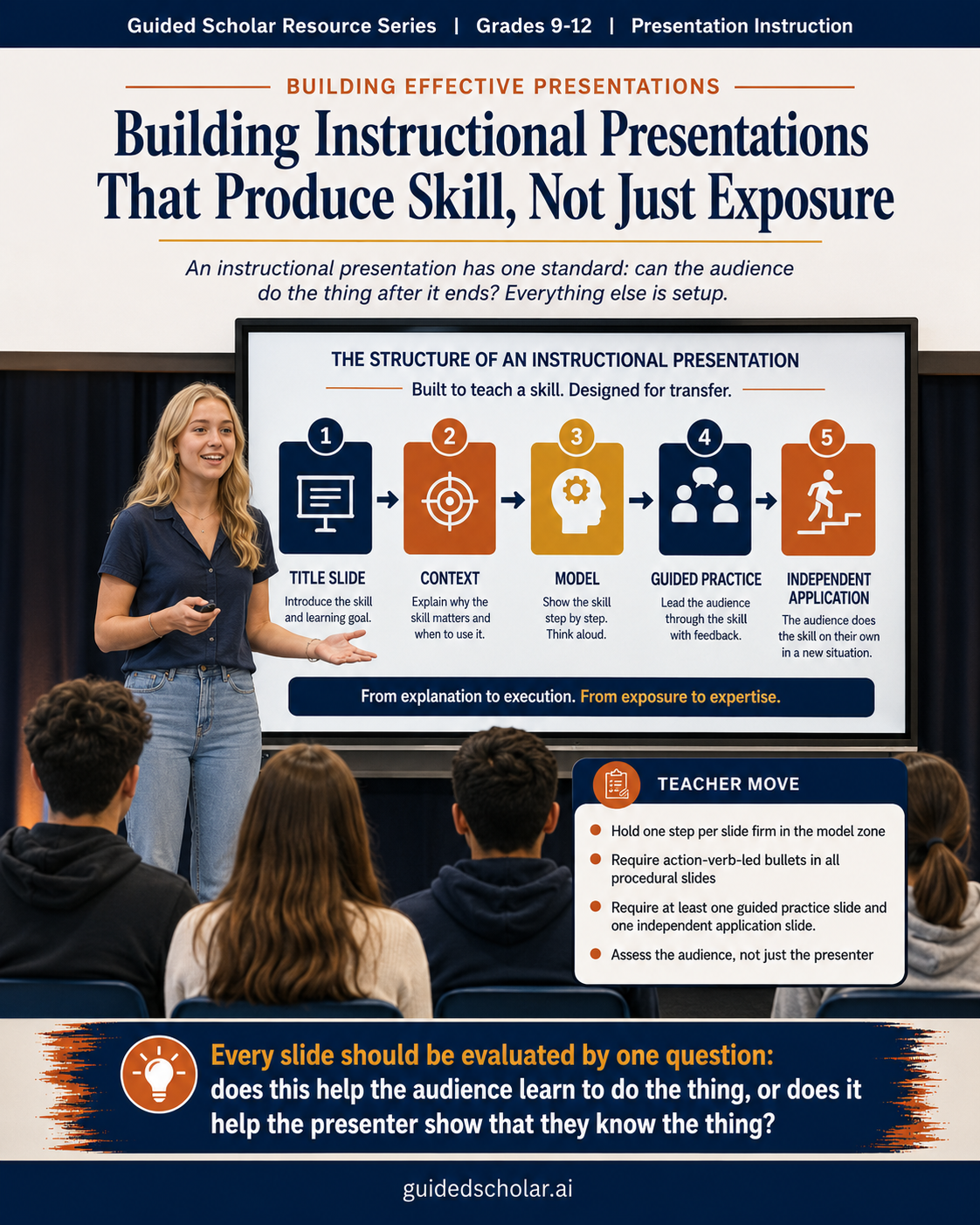
An instructional presentation follows a four-zone structure: context, model, guided practice, and independent application. The context zone answers why this skill matters and when it is used. The model zone demonstrates the skill step by step, with each step on its own slide. The guided practice zone walks the audience through an example together. The independent application zone gives the audience a problem to attempt.
Students who build instructional presentations without the practice zones are building demonstrations, not lessons. A demonstration shows the skill. A lesson transfers it. The practice zones are not optional additions—they are what makes the deck instructional rather than informative.
Building the Context Slides
The context slides answer one question: why does this skill matter and when will I actually use it? Students presenting to peers open with the definition or the first step because the content feels urgent to them. Their audience has not yet decided to care. A strong context slide makes the skill relevant before it is explained. For compound interest, it might show what $1,000 grows to over 30 years at different rates. The audience sees why the formula matters before they encounter it. Relevance before instruction increases attention and retention because it answers the implicit question every learner carries: why am I learning this?
Building the Model Slides: One Step Per Slide
The model zone is the instructional presentation’s most critical section, and the place where student presenters most consistently compress content. One step per slide is not a formatting preference—it is a cognitive load requirement. Richard Mayer’s research in Multimedia Learning (2009) establishes that learners cannot process more information than working memory can hold at one time. A slide showing all six steps of a process simultaneously is a reference document, not a teaching tool.
Each model slide carries three elements: the step number and name in the title, a brief description of what happens in this step, and a visual showing the step in action. For a mathematical process, that visual is the calculation at that stage. For a writing process, it is an example at that stage. For a procedural process, it is an annotated diagram. The presenter walks through each slide in sequence. The audience sees the skill broken into manageable pieces rather than demonstrated whole.
Bullet Formatting in Instructional Presentations
Bullets in an instructional presentation are procedural, not argumentative. They describe steps, conditions, or criteria—and they must be precise enough that a student reading them after the presentation can reproduce the skill without the presenter present. Instructional bullets should be action-verb led and specific. “Multiply the principal by the interest rate” is instructional. “Apply the rate” is not. Numbered bullets are appropriate when sequence matters, which in instructional presentations it almost always does.
The Visual Layer: Showing, Not Just Describing
The visual layer carries a higher burden in instructional presentations than in any other type because it must show the skill, not just represent the topic. A photograph of a calculator does not show how to calculate compound interest. A worked example with each variable labeled does. The test for each visual is not “does this relate to the topic” but “does this help the audience see how to do the thing.” Annotated screenshots, worked examples, step-by-step diagrams, and side-by-side comparisons of correct and incorrect application are the visual types that carry instructional weight.
The Guided Practice and Independent Application Slides
These two slide types are almost universally absent from student instructional presentations. The guided practice slide presents a problem and works through it with the audience step by step, using the same structure as the model slides. The independent application slide presents a new problem and gives the audience time to attempt it before the answer is revealed. The practice zone is where learning happens. Everything before it is setup. Students who omit these slides have delivered the setup without the learning.
What This Looks Like in Guided Scholar
Guided Scholar’s Teach Me mode builds the instructional presentation slide by slide. For each slide, the student writes the title, drafts the body text, and describes an initial visual they think fits the step being taught. Guided Scholar may suggest a different visual type if the one described does not carry instructional weight for that step, or recommend a visual if the student’s slide has none. A model slide with no visual is not a model slide—it is a text description of a step. The student makes the final decision. They can submit for feedback at any point during the build.
The teacher’s dashboard shows the slide-by-slide progression including each feedback cycle and subsequent revisions. A student who adds a guided practice slide after feedback, or who revises a model slide from a summary description to a step-by-step breakdown with a worked example, has demonstrated a specific understanding of how instruction works. That revision is visible in the record alongside the final product.
Practical Starting Points for Teachers
- Require the four-zone structure before any slide is built. Context, model, guided practice, and independent application. Students who cannot identify what belongs in each zone are not ready to build the deck.
- Hold the one-step-per-slide rule firm in the model zone. Students compress multiple steps onto one slide because it feels efficient. It is not efficient—it is confusing. Each step gets its own slide.
- Require action-verb-led bullets in all procedural slides. Every bullet in a model or practice slide begins with an action verb. Students who cannot write action-verb-led bullets are not yet clear on what the step requires.
- Assess the audience, not just the presenter. Build a brief independent practice task into the assignment. The instruction worked if the audience can do the skill. It did not work if they cannot.
- Require at least one guided practice slide and one independent application slide. These are not optional. They are what make the presentation instructional. Students who submit a deck without them have submitted an informative presentation with a narrower topic.
The Through Line
An instructional presentation is not a demonstration of what the presenter knows. It is a structure designed to transfer a skill to an audience that does not yet have it. Every slide should be evaluated by one question: does this help the audience learn to do the thing, or does it help the presenter show that they know the thing? Those are different products, and students rarely distinguish between them without explicit instruction on the difference.
Hattie, J., Visible Learning (Routledge, 2009); Mayer, R.E., Multimedia Learning, 2nd ed. (Cambridge University Press, 2009); Reynolds, G., Presentation Zen (New Riders, 2008).